Best Kayak Fish Finders of 2026

A fish finder built for a bass boat is a wonderful thing until you try to mount it on a 12-foot sit-on-top and realize the screen is the size of a paperback, the transducer bracket wants a transom you don't have, and the battery weighs more than your tackle box. Kayak fishing asks different questions: can you read the screen at a bad angle with sun bouncing off the water, can you work the buttons with wet hands, and will it still be running four hours into a drift? The right unit answers all three and stays out of the way of a deck you actually need to stand on.

I've had a graph bolted to a rail for years, and the biggest lesson is that transducer placement matters more than half the specs printed on the box — a modest unit in clean water will out-fish an expensive one strapped in the wrong spot. Over the past seven months my team and I took 12 fish finders out on the water, from castable pods to full sonar-and-GPS units, and the gaps in ease of use showed up almost immediately. Accuracy, screen visibility, and battery life are what separate a keeper from a paperweight, and the picks below are the ones we kept reaching for.

1

Best Overall

Garmin Striker 4

93 /100
Angler Score Outstanding

Key details

GPS
Waypoint map
Weight
8 oz
Max Depth
1,600 ft freshwater, 750 ft saltwater
Display Size
3.5 inches
Check Details on Amazon

Eight ounces is the number that decides this one. The Striker 4's head unit weighs about as much as a half-full water bottle, it carries an IPX7 water rating, and the 3.5-inch screen fits between a kayak's rails without crowding your paddle stroke. Inside there is CHIRP traditional sonar plus ClearVü scanning, which draws a stump or a ledge as something close to a picture instead of a smudge.

What keeps it ahead of the rest of this group is pairing that sonar with a waypoint map. We care less about the extra pixels a bigger display brings than about marking a brush pile and finding it again next weekend, and the built-in GPS does exactly that. The controls are dedicated buttons rather than a touchscreen, and on a wet deck with cold hands that matters more than slickness.

The 3.5-inch display is the compromise. Split it into sonar plus mapping and neither half gets much room, so most of the time we run one view full-screen and switch. Depth is quoted at 1,600 feet in fresh water and 750 in salt, far beyond anything a kayak will see; the limit that actually bites is the shallow end, where a soft, mossy bottom can leave the screen guessing.

Power comes from a 12-volt source you supply, and a small sealed battery tucked in the hull is the usual answer. The box includes transom and trolling-motor hardware alongside the tilt-and-swivel bracket, so the same head unit moves to a canoe or a friend's jon boat when the kayak stays home.

Pros

  • Eight ounces and IPX7 sealed
  • Waypoint map returns you to structure
  • CHIRP and ClearVü in one small unit
  • Dedicated buttons beat a wet touchscreen

Cons

  • Split-screen views are cramped at 3.5 inches
  • No battery included, you supply 12-volt power
Our verdict

The fish finder we mount on a kayak first: eight ounces, buttons that work with wet hands, and waypoints that bring you back to the same brush pile next weekend.

Check Latest Price
2

Best for Reading Structure

Humminbird PiranhaMAX 4 DI

90 /100
Angler Score Outstanding

Key details

Mount
Tilt and swivel
Sonar
Dual beam
Imaging
Down Imaging
Display Size
4.3 inches
Check Details on Amazon

Down Imaging is what separates this PiranhaMAX from every other unit here at its size, and over cover it earns the difference. Paddle across a fallen tree and the DI view draws the branches; the ordinary 2-D view tells you something is down there, and this tells you what it is. The 4.3-inch color display has enough room to make that distinction useful rather than decorative.

The plumbing is the catch. Down imaging wants the transducer in clean water with nothing between it and the bottom, which rules out the shoot-through-the-hull bed that is the tidiest way to protect a transducer on a kayak. Plan on a scupper arm or an over-the-side mount, and accept that the puck is exposed when you launch and land.

Our verdict is that the imaging is worth paying for only if structure is the question you are asking. Over open water, chasing depth and fish marks, the standard 2-D view does the same job with less to mount. The controls are the other small rub — the unit defaults to down imaging, and getting back to 2-D takes a few scrolls through menus in an order that never quite became habit.

Pros

  • Down Imaging draws timber and brush clearly
  • 4.3-inch color screen with room for detail
  • Dual-beam sonar plus fish and depth alarms
  • Small enough for a kayak rail

Cons

  • Needs a clean-water transducer mounting
  • Defaults to down imaging, menus take scrolling
Our verdict

Buy this one when structure is the question: Down Imaging separates timber, brush and pilings into readable shapes on a 4.3-inch color screen.

Check Latest Price
3

Best Screen in Sunlight

Lowrance Eagle 4X Bullet

82 /100
Angler Score Excellent

Key details

Weight
2.8 lb
Max Depth
500 feet
Display Size
4 inches
Display Type
IPS
Check Details on Amazon

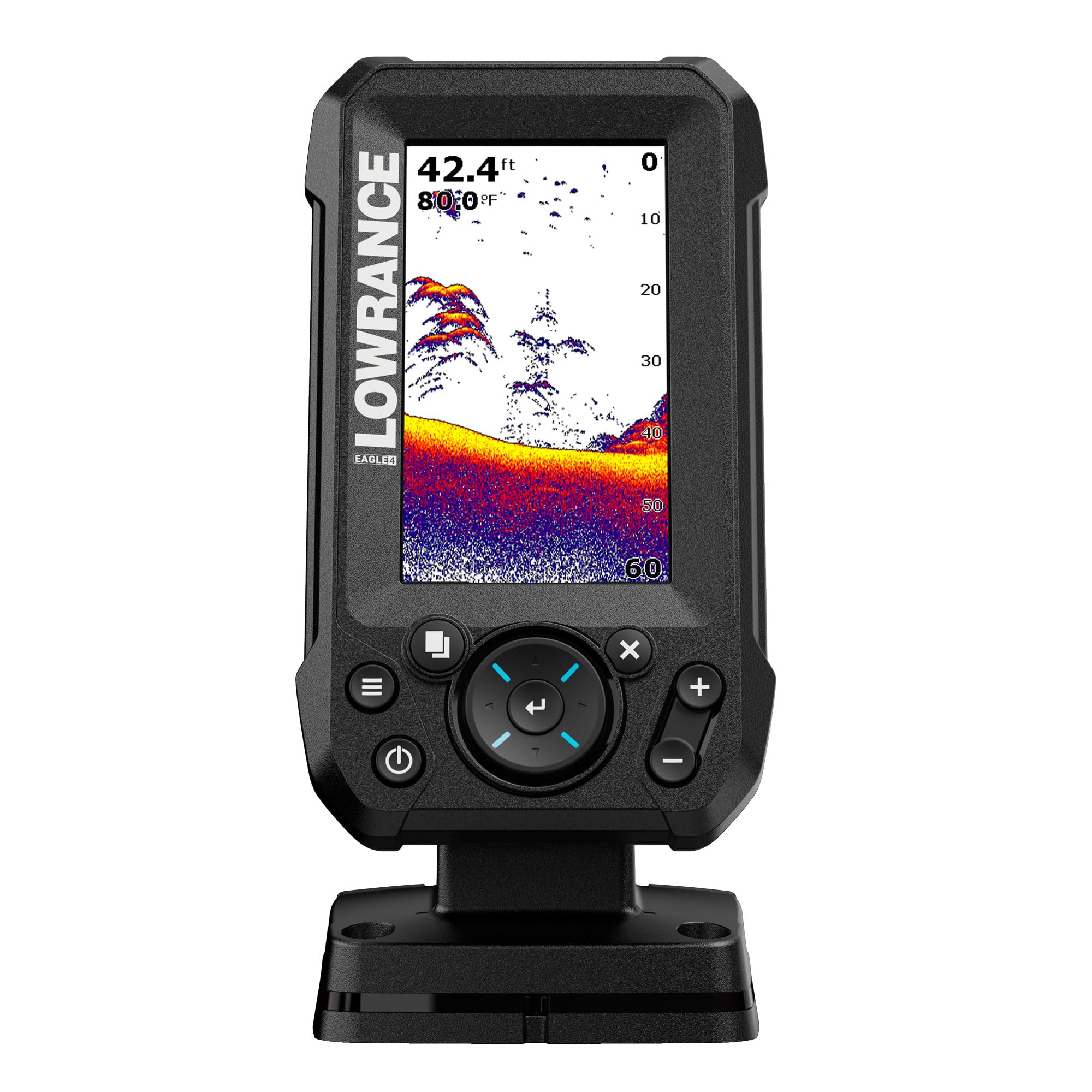
Polarized sunglasses are the quiet enemy of kayak electronics — plenty of panels go dark or rainbow when you tilt your head, and sun on open water is unforgiving. Lowrance sells this 4-inch display on staying clear from wide angles, in bright sunlight and through polarized lenses, and the portrait shape takes less rail space than a landscape unit of the same diagonal.

The feature we appreciate most is auto-tuning. Sonar settings are what quietly ruin a first season: gain too high, clutter everywhere, no idea which adjustment caused it. This unit picks the settings and leaves you to fish. The 200 kHz Bullet Skimmer's 44-degree beam is broad enough that you see a point coming before you are on top of it.

It is not a navigation unit. The 4X Bullet is the sonar version of the Eagle line, so there is no waypoint map in this box — check the model suffix when you order if marking spots matters. At 2.8 pounds it is also the heaviest head unit in this guide, which is fine on a console and noticeable on a rail that flexes.

Pros

  • IPS screen holds up through polarized lenses
  • Auto-tuning removes settings fiddling
  • 44-degree beam shows water ahead
  • Twist-lock connector for quick removal

Cons

  • No waypoint navigation in this version
  • 2.8 pounds is heavy for a rail
Our verdict

The screen we choose for bright water: a 4-inch IPS panel sold on polarized-lens clarity, with auto-tuning sonar underneath it.

Check Latest Price
4

Best Castable

Garmin Striker Cast

88 /100
Angler Score Excellent

Key details

Maps
Quickdraw Community contours
Weight
2.65 oz
Sonar Modes
Traditional 2-D and flasher
Wireless Range
Up to 200 feet
Check Details on Amazon

Clip the 75-gram puck to its 20-foot tether, throw it past the weed edge, and the bottom scrolls across your phone. That is the entire install: no transducer bracket, no cable through a scupper, no sealed battery to charge before a paddle.

On a kayak that is a genuine convenience. Nothing is attached permanently, so the deck stays clear and the whole thing goes back in its carrying bag at the ramp. The app also opens Garmin's Quickdraw Community contours at 1-foot intervals, a surprising amount of mapping from something you throw in the water.

The limits arrive once you are afloat. Signal can drop well before the advertised 200 feet, and the phone doing the displaying is also the phone running itself down, so a long float can end on a dead screen. Very shallow water is its weak spot, and the beam is narrow enough that you are sampling a column rather than scanning a flat.

We treat it as a scouting tool rather than a fishing instrument: it answers whether a bay is worth rigging for, then goes back in the bag. If you want numbers on a screen all day, choose one of the mounted units here. If you want to read unfamiliar water without drilling anything, nothing else in this guide does that job.

Pros

  • No mounting, wiring or separate battery
  • 75 grams casts easily on the tether
  • Quickdraw Community contours on your phone
  • Packs into its own bag

Cons

  • Signal can drop short of the 200-foot claim
  • Runs off your phone's battery
Our verdict

Buy it to read new water without attaching anything to the hull — a 75-gram puck you cast and watch on your phone.

Check Latest Price
5

Cord-Free Reading

LUCKY MT-202

84 /100
Angler Score Excellent

Key details

Weight
1.54 lb
Max Depth
147 feet
Display Size
3.5 inches
Wireless Range
853 feet
Check Details on Amazon

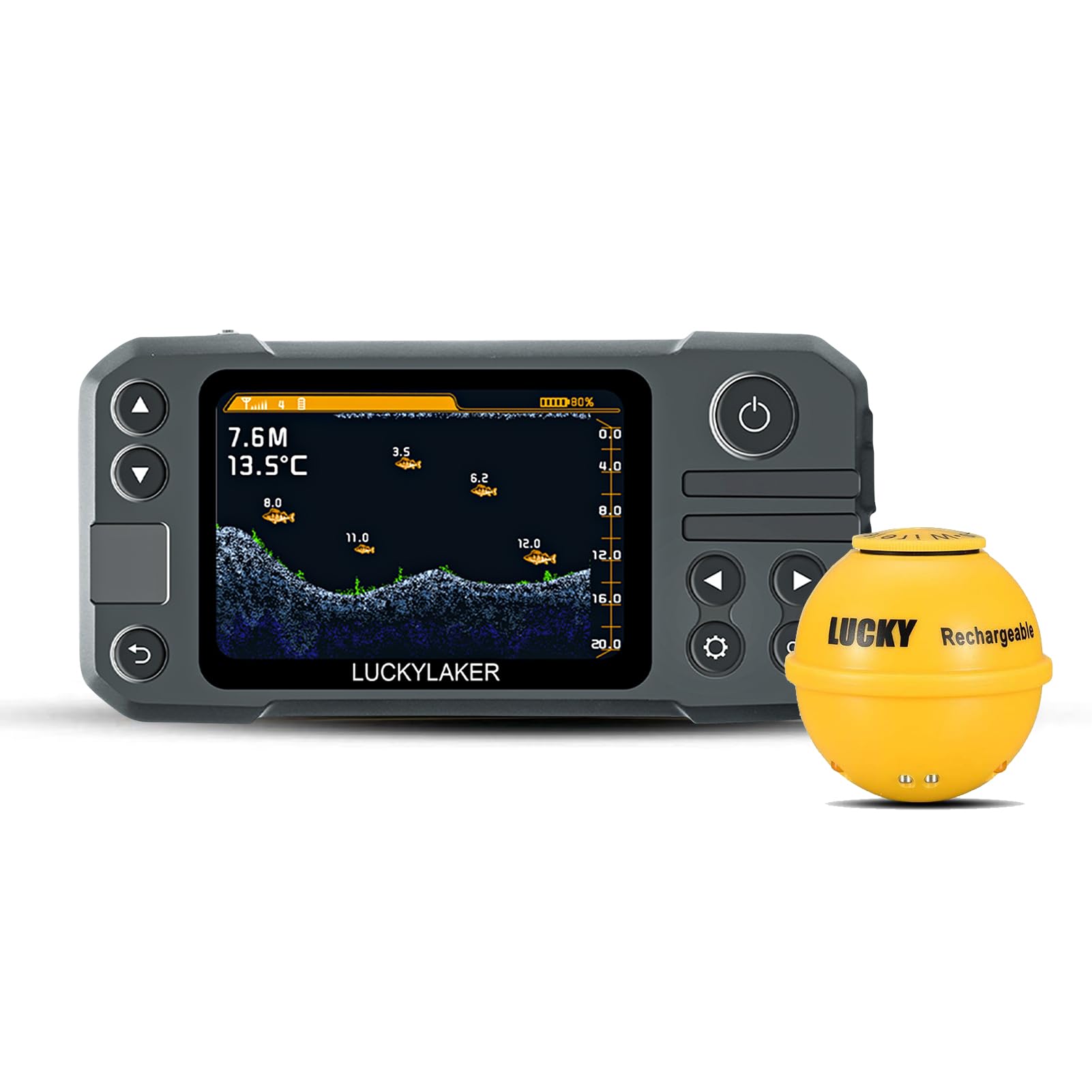
A floating sensor you cast and a 3.5-inch horizontal display you keep in the hull tray: that is the arrangement, and it is the middle path between a phone-only castable and a wired unit. The range claim is the headline — 853 feet between sensor and display, far more than a kayak needs and enough slack for a long drift. A dedicated screen that is not your phone is worth a lot on the water, and that is the whole appeal here.

The display shows fish icons with their depth, water depth, and alarm tones that pull your eyes off the paddle. Both halves are rechargeable, so a small power bank covers a second day and there is no bag of disposable cells to remember. In the water a kayak actually covers, it reads fish and bottom without argument.

Depth is where it gives ground. The sensor is rated to 147 feet, the shallowest ceiling in this group, which is fine for flats and back bays and no use over deep main-lake structure. There is no GPS or mapping either, so it tells you what is under you and nothing about where you are — a trade we did not mind for the water this thing suits.

Pros

  • Floating sensor with its own display
  • 853-foot wireless range
  • Rechargeable on both halves
  • Fish and school alarms

Cons

  • 147-foot depth ceiling
  • No GPS or mapping
Our verdict

Worth a look if you want a castable sensor without surrendering your phone: a floating puck and its own 3.5-inch display, in shallower water.

Check Latest Price
6

Budget First Sonar

Venterior VT-FF001

82 /100
Angler Score Excellent

Key details

Max Depth
328 feet
Beam Angle
45 degrees
Display Size
4.3 inches
Transducer Cable
25 feet
Check Details on Amazon

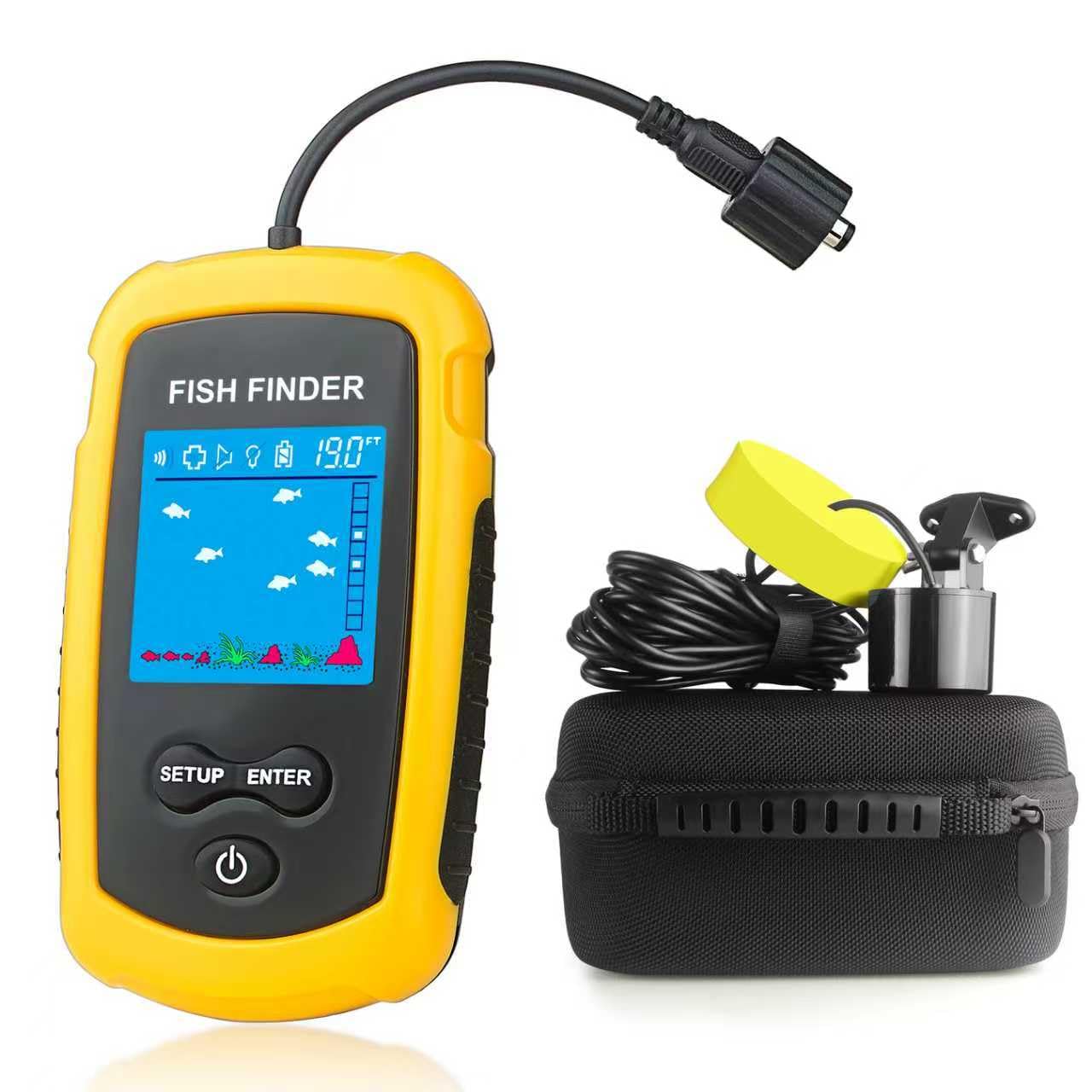
Twenty-five feet of cable is the whole idea. The sensor goes over the side on the end of it, the 4.3-inch LCD reads depth and fish, and you pull it back in when you move — no app, no pairing, no wireless handshake dying at the wrong moment.

A 45-degree beam and a 328-foot depth range cover anything a kayak will realistically fish, and the neck strap and water-resistant bag make it easy to keep the display out of the splash zone while you paddle. Depth is what we trust it for. The fish icons are the optimistic part of the screen: they flag that something is there and tell you very little about what.

As a first sonar unit, or a second one for a kid's kayak, it does the job without asking much. The cable is the part to think about — 25 feet of it has to live somewhere on a deck that already holds a paddle and a crate, and coiling it under way is a nuisance. Hand-over-hand it back in and keep the slack short.

Pros

  • Cabled sensor, nothing to pair
  • 4.3-inch screen at a budget price
  • 45-degree beam, 328-foot range
  • Neck strap and water-resistant bag included

Cons

  • 25 feet of cable to manage on deck
Our verdict

The cheapest way onto the water with a real screen: a cabled sensor, a 4.3-inch display and a depth reading that holds up.

Check Latest Price
7

Testing the Water

Yoocylii Handheld Fish Finder

82 /100
Angler Score Excellent

Key details

Max Depth
328 feet
Beam Angle
45 degrees
Display Size
4.6 centimeters
Sonar Frequency
200 kHz
Check Details on Amazon

This is the unit we point at anyone who is not sure sonar is worth the fuss. For the least money in this guide you get a 200 kHz transducer on a 45-degree beam, a 4.6-centimeter LCD, and an answer to the two questions that matter on a pond: how deep is it, and is there anything under me.

There is nothing to install. Switch it on, drop the transducer in the water, and the display reads down to 328 feet with fish icons sized small, medium or large and markers for weed, sand and rock on the bottom. A neck strap keeps it on you when both hands are on a paddle, which the bigger units here cannot manage.

Sunlight is the weak point. The screen is hardest to read with the sun behind you and glare on the water, and the depth numbers suffer first. It also goes through disposable cells quickly, so pack rechargeables. Neither matters much on a shaded pond or an early start, and neither should surprise anyone at this end of the range.

Pros

  • Toss-and-read sonar, nothing to install
  • Reads to 328 feet
  • Neck strap keeps it in reach
  • Fish-size icons and bottom composition

Cons

  • Screen washes out in direct sun
  • Hungry on disposable batteries
Our verdict

The unit we hand a first-timer: toss the sensor, read the depth, and find out whether sonar earns a place on your deck.

Check Latest Price

How We Tested the Best Kayak Fish Finders

We started with roughly 40 fish finders sold for kayak use and cut the list to 12 based on mounting hardware, transducer type, display size, and price. Anything that demanded a dedicated 12-volt battery, a transom mount, or a permanent hole in the hull was set aside — that isn't how most paddlers rig a boat. What survived were rail- and scupper-friendly units, wireless transducers, handheld models, and castable sonar, spread across price points so cheaper picks got the same scrutiny as premium ones.

Testing ran seven months across still lakes, a tidal creek, and one rocky river, with units swapped between a 10-foot sit-on-top, a pedal kayak, and a heavier 12-footer where deck space is tight. We rigged each one in a driveway after dark to see how long installation really takes, then logged battery life from launch to dead screen. On the water we trolled the same weedlines and drifted the same flats with every unit, reading depth against a weighted line dropped to the bottom.

Controls got judged with wet, cold hands and once with fishing gloves on, and we noted which menus required looking away from the water. At midday we checked each display from seated eye height with glare on it, and we tracked whether fish arches held steady on a pass or flickered and vanished. Paired units were carried until the phone connection dropped, and every unit came home covered in sand and spray to see how the buttons and ports held up.

How to Choose a Kayak Fish Finder

Start With the Mount, Not the Sonar

The transducer is where most kayak installs go wrong. A transom bracket needs a flat stern; a scupper-mounted arm hangs the puck under the hull where it catches grass; a shoot-through-the-hull bed of duct seal is the tidiest of the three but puts plastic between the sonar and the water. That last point rules it out for down imaging, which needs a clean path to the bottom — the PiranhaMAX 4 DI is the wrong unit to shoot through a hull.

We put mounting ahead of sonar specs for exactly that reason. Decide which of those three setups you can actually build on your boat, then buy a unit that matches it, rather than buying the feature list and discovering at the launch that there is nowhere to put the puck.

Screen Size Is a Space Decision

A 3.5-inch screen fits between the rails on a narrow boat; a 4.3-inch one is easier to read but claims more rail and usually more weight. Split a small display into sonar plus mapping and both halves get cramped, so plan on running one view full-screen and switching.

Then think about light. Matte LCDs wash out in direct sun, and polarized sunglasses can darken some panels further — an IPS screen sold on wide angles and polarized-lens clarity, like the Eagle 4X Bullet's, is worth paying for if you fish open water at midday.

Power Is a Separate Purchase

Mounted units run on 12 volts, and the battery is not in the box. A small sealed lead-acid or lithium pack in the hull is the usual answer, with an inline fuse on the positive lead, and you need to work out where the pack sits so it does not shift in chop. We treat the pack and charger as part of the purchase rather than an afterthought, because a dead screen halfway across a lake is the whole failure mode.

Castable and handheld units trade wiring for a battery budget instead: USB charging, disposable cells, or — with a phone-based castable — your phone's own charge, which is the one that matters most on a long day.

Beam Angle and Depth Range

Beam angle decides what you see. A 44- to 45-degree cone shows a wide slice of bottom per pass, which suits a drifting kayak; a dual-beam unit lets you switch to a narrow beam when you want detail over deeper water.

Quoted maximum depth — 328 feet, 500, 1,600 — is headroom, not a feature you will use, since most kayak water sits under 60 feet. The number that actually matters is how the unit behaves in 5 to 15 feet over weed and soft silt. If that is your water, spend the money on screen and mounting instead of depth.

Do You Need GPS?

If you fish the same small water every weekend, waypoints are a toy. If you fish big reservoirs where every brush pile and hump looks alike from the surface, a waypoint map — the Striker 4's, for instance — is the single most useful thing a kayak unit can do, because it lets you leave a spot and find it again.

Contour mapping is the next step up, and on a kayak it is usually overkill unless you are building your own map of a lake you fish constantly.

Frequently Asked Questions

Final Verdict

The Garmin Striker 4 is the one to buy first: eight ounces, a waypoint map and controls you can work in the rain, which is the whole job on a kayak. Change one requirement and the answer changes with it.

If structure is what you are hunting, the PiranhaMAX 4 DI draws it more clearly and asks for a cleaner transducer mount. If you never want to attach anything to the hull, the Striker Cast does the scouting from your phone and goes back in the bag.