
Best Side Imaging Fish Finder of 2026

Side imaging is the closest thing sonar has to flipping on the lights. Instead of a narrow cone straight down, the transducer throws a thin fan of sound out to port and starboard and paints whatever it hits — a sunken rowboat, a dock piling, a school tight to a ledge — into a picture you can actually read. I spent eight months with seven side-imaging units on two boats, and the gap between a screen you trust and one you squint at is wider than the prices suggest.

Here's what nobody tells a first-time buyer: the transducer mounting angle decides more of your image quality than the spec sheet does, and a couple of degrees off will smear even a great screen at speed. After that it's the daily stuff — reading the display in flat noon sun, punching in a waypoint mid-troll, and whether the thing still boots clean after a cold, wet morning. The picks below are the ones I'd bolt on again.

1

Best Overall

Humminbird Helix 7 G4

84 /100
Angler Score Excellent

Key details

Display
7 in. color TFT
Mapping
Humminbird Basemap, AutoChart Live
Side Imaging Range
125 ft each side
Included Transducer
XNT 9 HW MSI 150 T transom-mount
Check Details on Amazon

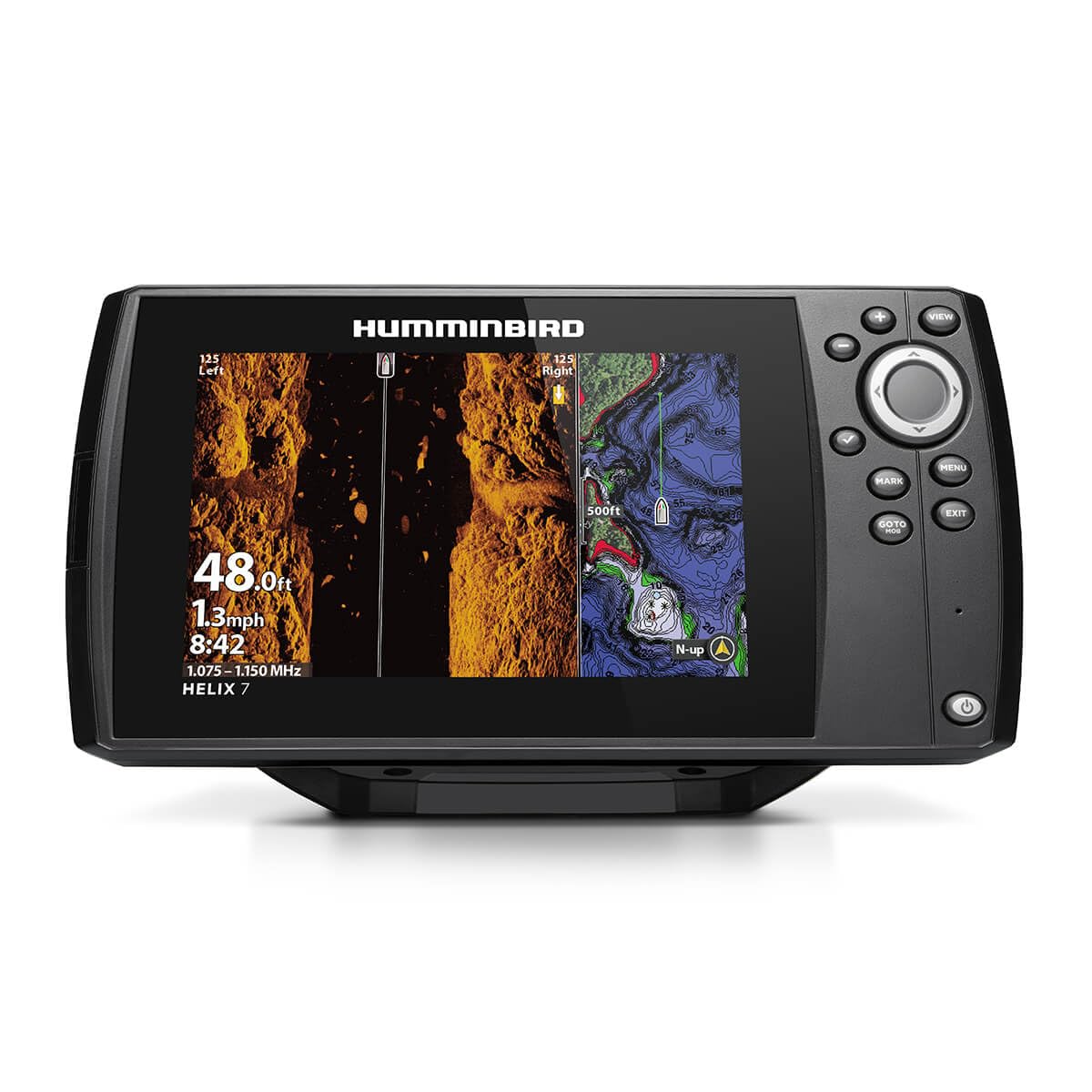
The Helix 7 G4 is the unit we hand to someone who wants side imaging without turning the console into a command center. MEGA Side Imaging reaches 125 feet on either side of the boat, and the same transducer gives you MEGA Down Imaging directly below. That is enough lateral coverage to trace a weed edge or a line of pilings before you make a cast, and it is why this one sits at the top of our list. The 7-inch color display is the practical size for a bass boat, tiller, or smaller center console, and the gimbal bracket lets you tilt it where you need it.

What makes it a chartplotter too is the built-in Humminbird Basemap, with 10,000-plus lakes and coastal coverage, plus AutoChart Live for recording your own depth contours, bottom hardness, and vegetation. We like that you can start with the built-in map and improve it the moment you find a hump or a creek channel. The softkey controls are another detail we appreciate: they give you defined buttons to work in spray and chop, and the menu structure keeps the most-used views close. The included XNT 9 HW MSI 150 T transducer is a transom-mount unit, so plan the cable run before you drill.

The 7-inch screen is the compromise to understand. Side imaging alone looks sharp, but split it with a map or a down view and the panels get compact. We did not mind that on a small boat, where the display sits close to the helm and the keypad is easy to hit with wet hands. If you regularly run three views at once, the 10-inch Lowrance or XPLORE is the more comfortable setup. For most anglers, the Helix 7 hits the balance of side range, mapping, and mounting space that makes side imaging useful every trip.

Pros

  • 125-foot MEGA Side Imaging on each side
  • Built-in Humminbird Basemap and AutoChart Live
  • Softkey controls work in spray and chop
  • Compact 7-inch gimbal-mount display

Cons

  • Side range trails the 200-foot XPLORE
Our verdict

We recommend the Helix 7 G4 as the best all-around side imaging fish finder here for boaters who want true MEGA Side Imaging and built-in mapping without a huge console footprint.

Check Latest Price
2

Best Large-Screen Chartplotter

Lowrance Elite FS 10

0 /100
Angler Score Fair

Key details

Display
10 in. multi-touch
Mapping
C-MAP Discover onboard
Networking
NMEA 2000, Ethernet, Wi-Fi
Sonar Package
Active Imaging 3-in-1 (CHIRP, SideScan, DownScan)
Check Details on Amazon

The Elite FS 10 is the one we reach for when the side scan has to share the screen with a chart, a down view, and still leave room for a bigger picture. The 10-inch multi-touch display is the largest here, and the Active Imaging 3-in-1 transducer covers CHIRP, SideScan, and DownScan with FishReveal. The side and down images are easy to read on structure, and the touchscreen makes it quick to switch between views. On a center console or bass boat, the extra screen changes how much you can watch at once.

Mapping is the other half of the case. C-MAP Discover is preloaded, with inland, coastal, and Canadian charts, so you get contours and structure without building a map first. The unit is also ActiveTarget 2 and ActiveTarget 2 XL ready, and it has NMEA 2000, Ethernet, and Wi-Fi for connecting the rest of the boat. We like that the sonar and chart package are included in one box; you are not buying a transducer and a map card separately. The suncover is a tight fit, so ease it off by a corner rather than pulling it straight.

The 10-inch class is not just about more pixels. It lets you keep a chart, a side image, and a down view in front of you while you idle a point, and the touchscreen means fewer menu dives when you want to zoom or mark a waypoint. We came away thinking of the Elite FS 10 as a small-boat chartplotter that happens to have excellent side scan, rather than a side imager with a chart bolted on.

Pros

  • 10-inch multi-touch display with clear side imaging
  • Preloaded C-MAP Discover charts
  • Active Imaging 3-in-1 transducer included
  • ActiveTarget 2 ready with NMEA 2000 and Ethernet

Cons

  • Large 10-inch footprint needs dash space
Our verdict

Choose the Elite FS 10 if you want the biggest, most chart-ready screen in this group and do not mind giving it dash space.

Check Latest Price
3

Best Long-Range Side Imaging

Humminbird XPLORE 10

0 /100
Angler Score Fair

Key details

Display
10 in. color touchscreen
Mapping
Humminbird Basemap, AutoChart Live
Networking
One-Boat Network, Ethernet, NMEA 2000
Side Imaging Range
200 ft each side
Check Details on Amazon

The XPLORE is the Humminbird for someone who has already decided the console can take a 10-inch screen. MEGA Side Imaging+ reaches 200 feet on each side, and MEGA Down Imaging+ covers the same 200 feet below, which is the longest side range in this group. The 10-inch HD touchscreen is the obvious upgrade over the Helix 7, but the keypad matters just as much: we like having physical buttons when the boat is moving and touch when we are idling over a brush pile. Bluetooth anchor control and smartphone notifications are useful extras if the rest of the boat is already in the Humminbird ecosystem.

The One-Boat Network integration is the reason to pay attention if you run a Minn Kota trolling motor or Cannon downriggers. Ethernet and NMEA 2000 let the XPLORE sit at the center of a bigger system, and the included Humminbird Basemap and AutoChart Live give you a chart to start with and the tools to improve it. The three-year warranty with registration is the longest coverage in this group, which matters on a unit with this much screen and networking.

The XPLORE makes the most sense when you are building a system, not just adding a fish finder. The extra range and networking are real upgrades, but they only pay off if you will use them. If your fishing is mostly local and simple, the Helix 7 covers the core side imaging job with less screen and less system to manage.

Pros

  • 200-foot MEGA Side Imaging+ on each side
  • 10-inch touchscreen plus physical keypad
  • One-Boat Network, Ethernet, and NMEA 2000
  • Three-year warranty with registration

Cons

  • Heavier and bulkier than 7-inch units
Our verdict

The XPLORE 10 is our pick for Humminbird loyalists who want the longest side range here, a touchscreen, and room to network the rest of the boat.

Check Latest Price
4

Best Budget

Garmin Striker 7SV

88 /100
Angler Score Excellent

Key details

Sonar
CHIRP, ClearVü, SideVü
Display
7 in. sunlight-readable
Mapping
Quickdraw Contours
Connectivity
Wi-Fi with ActiveCaptain
Check Details on Amazon

The Striker 7SV is the budget side imager we recommend when the goal is finding structure, not running a chartplotter. Garmin's SideVü and ClearVü are both here, along with CHIRP traditional sonar, and the 7-inch sunlight-readable display is easy to mount on a smaller boat. We like the simplicity: the unit is light, the menus are straightforward, and the side and down views give you a clear look at bottom changes without a lot of setup. It is the least expensive way into side scanning in this group, and it does not feel like a toy.

Quickdraw Contours is the mapping story. It records 1-foot contours for up to 2 million acres, so you can build your own map of a lake or a stretch of river and keep adding to it. Built-in Wi-Fi connects to the ActiveCaptain app for waypoints and software updates, and the GPS marks spots and shows speed. We like the discipline this unit encourages: you fish the water, log the contours, and come back with a map that is yours.

We also appreciate how little space the 1.7-pound head takes up. On a kayak or a small skiff, that matters more than a bigger screen you cannot fit. The unit does not have the networking or live-sonar expansion of the Lowrance or XPLORE, but that is not what this pick is for. It is a straightforward side-scanning fish finder for an angler who would rather learn the water than buy a chart package.

Pros

  • SideVü and ClearVü scanning in a budget unit
  • Quickdraw Contours maps up to 2 million acres
  • Light 1.7-pound head fits small boats
  • Built-in Wi-Fi with ActiveCaptain

Cons

  • No preloaded charts; navigation is limited
Our verdict

We point budget-minded anglers to the Striker 7SV for capable SideVü and do-it-yourself Quickdraw mapping, as long as preloaded charts are not the goal.

Check Latest Price

How We Tested Side-Imaging Fish Finders

We built the shortlist from manufacturer spec sheets, a few very long forum threads, and time spent handling display units at two tackle shops, then cut it down by what actually matters on the water: screen size and brightness, whether a side-scanning transducer came in the box, built-in mapping versus a card slot, and what you get for the money. Seven units made the final cut and ran for eight months, from ice-out through the first cold mornings of late fall.

Each unit was mounted on one of two boats: a tiller-steer aluminum working a stump-filled river bend, and a console boat that took big wind across open reservoir flats. We installed every transducer ourselves and timed the job, then re-checked the mounting angle after the first run, since a few degrees off shows up as a dark, smeared band down one side of the image. We also watched how long the first power-up took and whether the bracket held its angle after a two-hour tow.

On the water we marked the same brush piles, ledge drops, and dock pilings with each unit, then compared how much of that structure we could actually name at idle and again at planing speed, where side imaging tends to fall apart. We read each screen in flat noon sun and through polarized glasses, and judged image quality at 30, 60, and 80 feet of range.

Navigation got its own pass: build a route, drop waypoints on fish, follow the track back to the ramp after dark. Reliability meant cold starts, rain, spray over the bow, and a summer of heat on the dash. Every claim on the box — range, resolution, mapping, what's included — got checked against what the screen actually did, and at the end we asked whether each unit earned its price next to the others.

How to Choose a Side Imaging Fish Finder

Start With Side Range and the Transducer Package

Side range is the number to check first: it tells you how far off each beam looks. The Helix 7 G4 reaches 125 feet each side, while the XPLORE 10 reaches 200. More range helps on big flats and deep structure, but it is not automatically better in shallow cover, where a tighter, brighter image often tells you more. We also look at what comes in the box. A head unit without the right side-scan transducer is not the deal it appears to be, so confirm the transducer model and whether it is transom- or trolling-motor mounted.

Match the Display to Your Helm

A 10-inch screen is a genuine advantage when you run a chart, side image, and down view together. It is also a physical commitment: the Lowrance Elite FS 10 and XPLORE 10 are both large units, and the XPLORE weighs 4.8 pounds. A 7-inch model like the Helix 7 or Striker 7SV fits smaller consoles and leaves your sightline clear. We prefer a touchscreen for quick zooming and waypoints, but physical keys are easier with wet hands or gloves. Measure the dash opening, the bracket swing, and the space behind the screen before you choose.

Decide Whether You Need Preloaded Charts

GPS and charts are not the same thing. Every pick here can mark waypoints and show speed, but only some come with a chart package. The Helix 7 includes Humminbird Basemap and AutoChart Live; the Lowrance includes C-MAP Discover. The Garmin Striker 7SV relies on Quickdraw Contours, which builds a map as you drive. That is a powerful tool for familiar water and a poor substitute for navigating an unfamiliar coast. If you run new water, pay for the preloaded chart. If you fish the same lake and enjoy mapping, Quickdraw can be enough.

Plan the Mount, Power, and Expansion

Most side imaging problems start before the boat leaves the ramp: a transducer mounted too high, a cable run that catches the steering, or a display that blocks the compass. We check the transom angle and the cable path first, then decide whether the transducer belongs on the transom or a trolling motor. Power should go through the supplied fuse, not a bare circuit. If you might add live sonar or a trolling motor, look at the networking: the XPLORE uses One-Boat Network and NMEA 2000, and the Lowrance is ActiveTarget 2 ready.

Frequently Asked Questions

Final Verdict

For most boaters, the Humminbird Helix 7 G4 is the side imaging fish finder we recommend first. It pairs 125-foot side coverage with built-in mapping and a compact 7-inch display, so you can scan structure and navigate without rebuilding the dash. Choose the Lowrance Elite FS 10 if you want a 10-inch touchscreen and preloaded C-MAP charts, the Humminbird XPLORE 10 if 200-foot side range and One-Boat networking matter, or the Garmin Striker 7SV if you want capable SideVü at the lowest price and will build your own Quickdraw map.